Posts

Showing posts with the label Computer

Useful (and FREE) Hard Drive Utilities

Currently, I'm working on a laptop for one of my clients and thought I would share a few of the FREE hard drive utilities that I used to get the computer back in working order. First, after a CHKDSK scan revealed and successfully relocated 3000-some-odd bad clusters, I informed my client that the HD would need to be replaced. At this point I decided that cloning the HD to a new drive would be a reasonable course of action. A new 500 GB HD would replace the old 250 GB drive. Here are few utilities that I used to accomplish this: Clonezilla (  http://clonezilla.org/  ), is a Norton Ghost-esque, Debian Linux-based drive cloning live CD. Clonezilla offers several different methods for cloning drives, but for my needs I opted to download and burn the latest stable CD-ROM bootable .iso image to CD. I attached the new HD to the laptop using a SATA-to-USB adapter cable, booted from the Clonezilla CD, and performed a direct local disk to local disk image. The imaging work...

The NeXT Mac

Image
It has been five months since the passing of Steve Jobs. Unfortunately, or perhaps fortunately, I was a bit distracted when Mr. Jobs passed and I wasn't able to give the proper respect that someone would expect to give to the passing of one of their idols. For as long as I live, I will never be able to forget the date Steve died. The next day my wife gave birth to our first children, twin boys, on 10/6/2011. March 2012 marks 15 years since I first learned that Apple acquired NeXT and Steve Jobs would be returning to the company. It's hard to believe that much time has gone by, but I remember it very well. Back in 1997, although I had only been using Mac's for about four years (and only owned one for two years) I was very staunch in my belief that the Mac was the superior platform, and could never see myself as a Windows user. I was a senior in high school at the time, and had carefully woven my way into a position where I was doing all of the technical support for m...

Classic II #2... Needs some work...

Image
Broken. Eventually, I was going to pull out a computer that legitimately didn't work. I knew they were there. At least this one is my "spare" Classic II. Still, I can't help but feel bad for it. If I had to make a guess, I would say this Mac is the victim of bad capacitors on the motherboard. Since, this is a spare computer I really don't have anything to lose by washing the motherboard to remove the conductive fluid from the leaking capacitors. As of this writing, I have removed and (my wife) washed and rinsed the motherboard. I am going to let it dry for a while - possibly a couple weeks, to make sure there is no water left to short out the components and cause more damage. I'm not really confident that washing the board will allow the computer to boot, but again I have nothing to lose. Either way, the capacitors need to be replaced. I'm not sure if I'll do this or part out the computer for spare parts for my other Mac's or just put it on the she...

Video of my collection

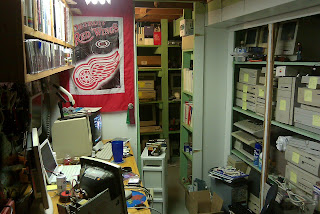
Just a quick video of my collection and the cramped quarters in which it resides. I have another 6 computers that are not in the video, but you get the point. :)

Macintosh Classic II

Image
Might as well start with what's out in the open. This Classic II has been sitting on my workbench with its guts exposed for so long, that I don't even remember what I was doing with it when I opened it up in the first place! I'm not even sure if it works... First things first lets give it a visual inspection to see if everything is hooked up. Hmm... the motherboard is partially pulled out, but it looks like all the connections are hooked up... HD, floppy, power supply, battery is installed... A keyboard, mouse, and power cord are already hooked up, so lets see if it works... Lo and behold, it fires right up! Looks like it has a ton of extensions loaded. After the parade of icons finishes and the desktop loads, I opened "About This Macintosh". This particular Classic II has System 7.1 loaded, with 4 MB RAM, and a 40 MB HD - that is practically full! The screen is exceptionally sharp and clear. There is software for sharing DOS files, Microsoft Word 4.0, FileMaker P...

Where to start?

Image
That is the question not just for this blog, but for the project that will be its primary subject. I have a sizable collection of vintage computers, consisting of 70+ machines from a handful of different manufacturers. My primary interest is Apple. I've been a Mac user since 1993, when my best friend received a Macintosh Quadra 605 for Christmas. One year later, for Christmas, I received my first computer, a used Macintosh IIsi that my mom bought from a co-worker. It had 9 MB RAM, 40 MB HD, and a 20 MHz Motorola 68030 CPU. I purchased my second computer in 1997, a Mac PowerBook Duo 270c. A laptop. The Duo and IIsi were my main computers until my first new computer purchase - The iMac, in 1998. After that it is all kind of a blur... How did I come to acquire 70+ computers? Honestly, I'm not quite sure. It just kind of happened. I'm not even sure where they all came from. The collection is relegated to a corner of my basement, where it resides out of sight, sitting on crude s...